How to Enroll in Multi-factor Authentication
Live Tap Lists is now even more flexible and more secure!
Choose between:
-
Log in with Google
-
Log in with Email & Password
Add an additional layer of security by enabling multi-factor authentication from your profile!
Get started
First, sign up for a Live Tap Lists subscription for free at /free-trial
Then, create your account at https://app.livetaplists.com/dashboard
-
Here, you can choose between two login options. Google and Email/Password
-
Both login options support multi-factor authentication
Setup Multi-factor authentication
Once logged in, navigate to your profile https://app.livetaplists.com/dashboard/profile
Click the link for “Setup Multi-Factor Authentication”
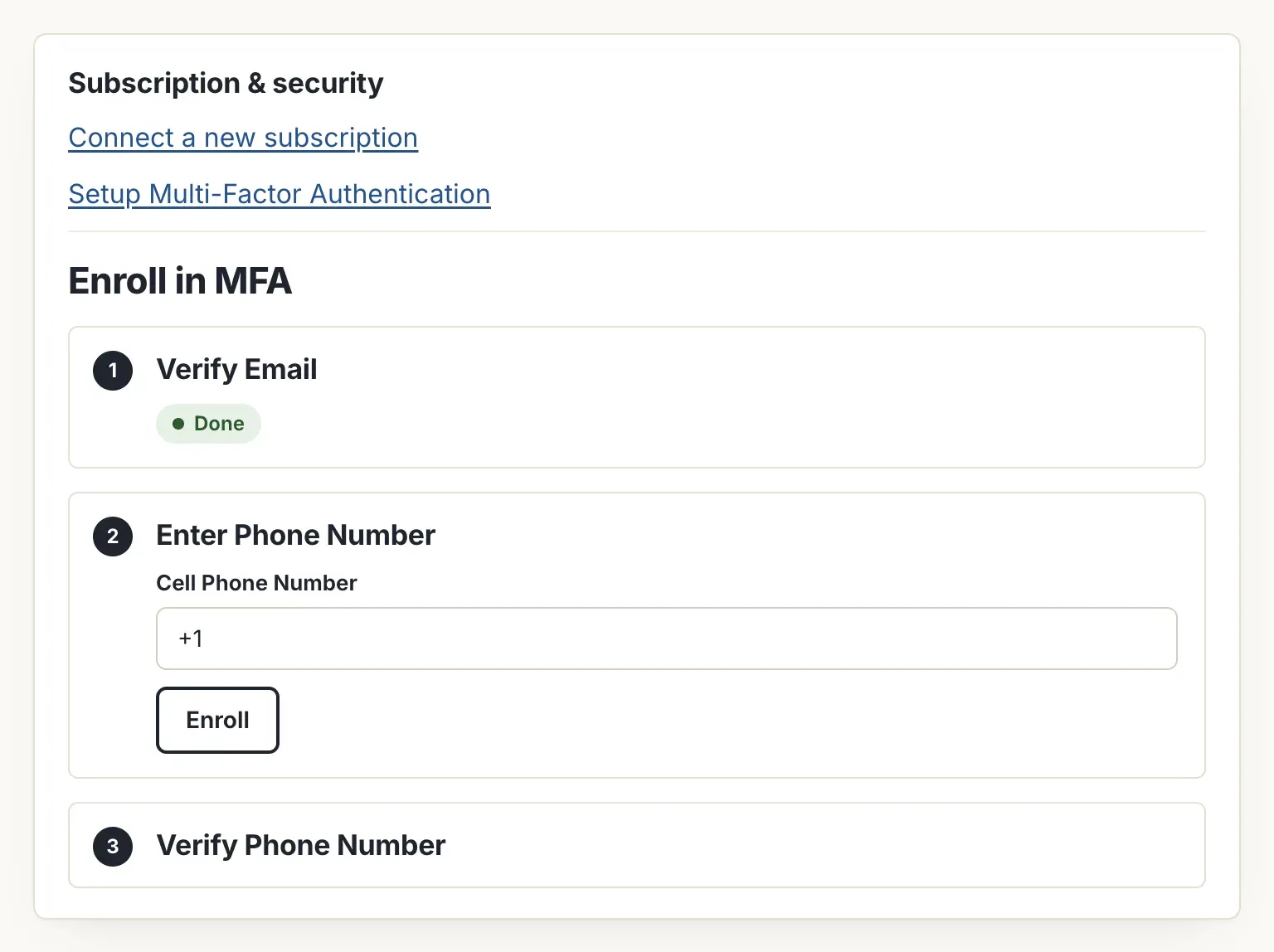
Follow the three steps required:
-
Verify Email - This will send a verification link to your email address
-
Enter Phone Number - This will send a code to your phone number
-
Verify Phone Number - Enter the code to verify the phone number
You’re Enrolled!
Now you are enrolled in multi-factor authentication. Each time you log in, a verification code will be sent to your phone number, and you will need to enter that code to complete your login.
You will receive an email with a link to remove the second factor of authentication if you choose to un-enroll from multi-factor-authentication.